We Made Software Easier to Use. Then We Took the UI Away

We’ve come full circle with interfaces
We started with command lines.
You sat in front of a black screen. You typed words you had to memorise. Miss one character and nothing worked. Power came from recall. Skill meant knowing the right command at the right time.
Then desktops arrived.
Windows, icons, menus, pointers. You could see what was possible. You could click instead of remember. Discovery replaced recall. Computers opened up to people who did not want to learn a language just to use a machine.
Then mobile changed everything again.
Touch removed even more friction. No keyboard. No mouse. Just gestures and buttons sized for thumbs. Interfaces became quieter. Many decisions were hidden behind flows and defaults. You did not need to know much at all. You just followed the path.
Now look where we are.
We are typing prompts again.
Large language models, chat interfaces, agent tools. A text box and a cursor. Ask the right thing and you get magic. Ask the wrong thing and you get noise. Results depend on phrasing, order, context, and follow-up prompts.
Sound familiar?
From recall, to recognition, back to recall
Classic UI design tried to reduce cognitive load.
Menus show you what is possible. Buttons suggest actions. Forms guide you step by step. Good design helps you recognise options rather than recall them.
Prompt-based systems flip that.
- You must know what to ask.
- You must know how to ask it.
- You must remember what worked last time.
- You must learn patterns and prompt structures.
We removed visible UI and replaced it with language.
That feels powerful, but it also shifts work back onto you.
Why this feels both exciting and tiring
Prompt systems feel fast when you know the moves.
Just like terminals did.
Experts fly. Beginners freeze. Everyone builds private cheat sheets. Communities share prompt recipes the way developers once shared command flags.
- You are not really “just chatting”.
- You are operating a system through text.
The difference is that the system pretends to be human.
That makes the learning curve harder to see.
This is not a step backwards, but it is a loop
Each interface era solved a problem and created another.
- Command lines gave precision but demanded memory.
- Desktops gave visibility but added clutter.
- Mobile gave simplicity but reduced control.
- Prompt interfaces give flexibility but demand intent.
None of these disappear. They stack.
- We still use terminals.
- We still use desktops.
- We still use touch.
- Now we also converse with systems.
The question is not which one wins.
The real question
How much thinking should the system do for you, and how much should you do for it?
- If the future is prompt-driven, then prompt literacy becomes a basic skill.
- If we want broader access, then prompts need scaffolding, memory, and visible structure.
- If we ignore that, we recreate the same barriers we once worked hard to remove.
We escaped the command line once by making computers easier to use.
Are we about to make them hard again, just in a different way?
And if so, who benefits from that?
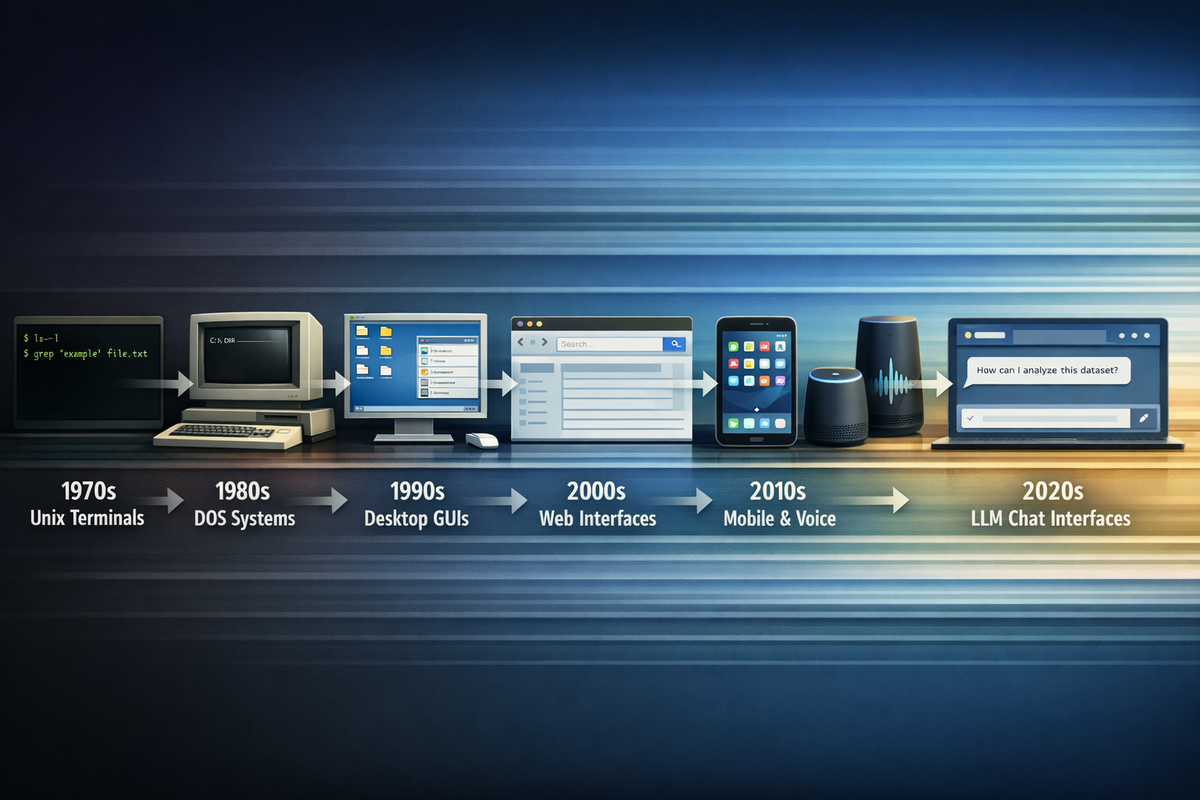
A short timeline of how we got here
1970s – Unix terminals
You interact through text only. Commands, flags, pipes. Power comes from precision and memory. If you do not know the command, you cannot progress.
1980s – Home computers and DOS-style shells
Personal computing spreads, but the model stays the same. You type instructions. Manuals matter. Knowledge sits in your head, not on the screen.
Mid-1980s to 1990s – Graphical desktop interfaces
Windows, icons, menus. You point and click. Options become visible. You explore instead of memorise. Computing becomes accessible to many more people.
2000s – Web interfaces
Browsers turn software into pages and forms. Navigation replaces commands. Search becomes the main way you find things. You type less, scan more.
Late 2000s to 2010s – Mobile touch interfaces
Thumb-first design. Gestures replace clicks. UI removes choice where possible. Defaults and guided flows take control. You follow paths rather than define them.
Late 2010s – Voice assistants
You speak instead of type. The promise is natural interaction, but the limits are rigid. If you say the wrong thing, nothing happens.
2020s – LLM chat interfaces
A text box returns. You type instructions again. Results depend on phrasing, sequence, and context. Power users learn patterns. Prompt craft becomes the skill.
What changes each time is not the technology.
It is where the burden of understanding sits.
Earlier systems made you adapt to the machine.
Later systems adapted the machine to you.
Now we are negotiating with it, one prompt at a time.
Does that feel like progress to you, or familiarity wearing new clothes?